How To Take Apart the Flip Video Ultra
Filed Under Gadgets & Hardware, Geek on 2009-04-13, 12:50
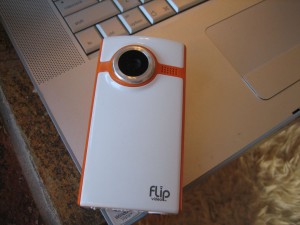
I love the idea of the Flip Video cameras.I bought a Flip Video Ultra last year and it has served me quite well. It’s small enough that it’s easy to carry around for those random moments when you wish you had a video camera. It’s cheap enough to not worry about taking it places where it could get absolutely destroyed. And it has enough space (60minutes) to record quite a bit of video.
However when I was doing some video for the 2009 Valentine’s Day Pillow Fight I noticed that the power switch was not sliding as easily as I remembered and would occasionally stick and cause problems when I needed to quickly turn the camera on and start recording. I figured it was just dirty so I’d open it up and clean it. I didn’t want to just start pulling stuff apart as I’ve broken many a plastic tab with this method. I did a quick search to see if there were any tear-down guides for disassembling the Flip Video camera, but came up short. I did find this video which was helpful, but also difficult to flip back and forth through. So here’s my quick photo guide to dismantling should you want to clean things, modify the LED, microphone, or whatever.


Unfortunately after all that disassembling and reassembling my power switch was still sticking. A couple loosening turns of the screw closest to the power switch was actually all the solution I needed. It was still interesting to take a look at the guts of my trusty Flip though.
Tagged: Flip Video, How-To
Comments
17 Responses to “How To Take Apart the Flip Video Ultra”
Leave a Reply
-
Subscribe

Subscribe to my feed -
Twitter
-
My Other Stuff
-
Find It
-
Sites I Like
-
Archives
- August 2014
- May 2014
- April 2014
- February 2014
- November 2013
- October 2013
- September 2013
- July 2013
- June 2013
- May 2013
- January 2013
- September 2012
- August 2012
- July 2012
- May 2012
- March 2012
- February 2012
- September 2011
- June 2011
- May 2011
- March 2011
- December 2010
- June 2010
- April 2010
- March 2010
- February 2010
- January 2010
- December 2009
- November 2009
- October 2009
- September 2009
- August 2009
- July 2009
- June 2009
- May 2009
- April 2009
- March 2009
- February 2009
- January 2009
- December 2008
- November 2008
- October 2008
- September 2008
- August 2008
- July 2008
- June 2008
- May 2008
- April 2008
- March 2008
- February 2008
- January 2008
- December 2007
- November 2007
- October 2007
- September 2007
- August 2007
- July 2007
- June 2007
- May 2007
- April 2007
- March 2007
- February 2007
- November 2006
- October 2006
Geeked.info

do you have a modification to be able
to add an external microphone, or know
someone who does
Great instructions. I noticed you use Energizer 2000 mA recharables. I use the same, great (camera-hacking) minds think alike. 8-) I also wanted to add that one of your steps mentioned that you damaged a screw mount by tightening the screw too much. You may not have caused as much of the problem as you thought. On my camera, that same screw mount was cracked, the first time I took the camera apart. Maybe yours was too. Anyway, thanks again.
Thanks steven! Always good to know that something might not be my fault. :)
Unfortunately I don't. If you do find someone who does, share a link! :)
do you know how take apart the flip minoHD
Disassembling the Flip Ultra HD is essentially the same. Once you get the back off and expose the circuit board there are 3 screws near the bottom of the CB to get, and 3 above the LCD to get. The last is under the LCD itself. The LCD screen should just flip forward with a good shake, exposing the last screw to get.
My first Ultra HD is ruined because the 1/4″ 20 mount on the bottom, believe it or not. I'd been attaching the camera to a NOGA arm and by using the locking shoe against the bottom of the camera the mount started rotating inside the camera. Well, the mount's holding system is poorly designed so it doesn't hold well, plus it sits RIGHT NEXT TO THE CIRCUIT BOARD! So I damaged the board when the mount began to rotate rendering the buttons useless.
My new Ultra HD I've cracked open, and filled the area surrounding the mount on the inside with Gorilla Glue, which expands and becomes extremely ridged. Hopefully, this will solve the mount problem… that and not wrenching down the locking shoe so tightly.
Disassembling the Flip Ultra HD is essentially the same. Once you get the back off and expose the circuit board there are 3 screws near the bottom of the CB to get, and 3 above the LCD to get. The last is under the LCD itself. The LCD screen should just flip forward with a good shake, exposing the last screw to get.
My first Ultra HD is ruined because the 1/4″ 20 mount on the bottom, believe it or not. I'd been attaching the camera to a NOGA arm and by using the locking shoe against the bottom of the camera the mount started rotating inside the camera. Well, the mount's holding system is poorly designed so it doesn't hold well, plus it sits RIGHT NEXT TO THE CIRCUIT BOARD! So I damaged the board when the mount began to rotate rendering the buttons useless.
My new Ultra HD I've cracked open, and filled the area surrounding the mount on the inside with Gorilla Glue, which expands and becomes extremely ridged. Hopefully, this will solve the mount problem… that and not wrenching down the locking shoe so tightly.
Awesome stuff…my power button is doing the opposite of sticking…when you press it, it pretty much collapses…consequently, it doesn't power on. I'm going to open it up and see what I can do.
Awesome stuff…my power button is doing the opposite of sticking…when you press it, it pretty much collapses…consequently, it doesn't power on. I'm going to open it up and see what I can do.
Any thoughts as to where I can get a replacement LCD display screen for the ultraHD??
Had the same issue with tripod mount.
Had the same issue with tripod mount.
My USB arm isn’t recognized by the computer.. can I somehow download the video using the “TV” port on the side? has anyone downloaded that way?! Thx!
replacement lcd!! want one! flip does not want to answer this question..
My first ultra hd was also ruined by the mounting shoe on the bottom. I used one of those standard little tripod stands you buy at best buy, and the screw part is TOO LONG, and broke the circuit board when I screwed it in! I was so upset and dissapointed, taking it back tomm, for a new one. Glad I saved my receipt!!
Very good. I personally think that wigs most beautiful women in the world are black women with natural or natural unrelaxed afros, dreadlocks unrelaxed. One thing that makes natural lace wigs so exciting to see is that it is so rare to see (on females), even here in New York or New Jersey. Most sistas have time boring, ugly, relaxed front wigs They take the beauty of their own genes for granted! My own sister, my mother all relax their hair extensions.
Moncler è il marchio più famoso d’inverno in questo mondo, Piumini Moncler nel mondo della moda è più popolare di altri marchi, e rende possibile per ogni uomo e donna di guardare a caldo su un weather.In molto freddo il nostro sito possiamo permetterci tutti i tipi di Moncler Donna e Uomo Moncler, credo fermamente che si può prendere agli occhi degli altri con la giacca Moncler state portando alla moment.Creativity e innovazione è il motivo per questo marchio è molto attractive.And il materiale di Moncler è tutto all’acqua calda, così che tipo di freddo in questo inverno, non abbiate paura, perché si ha un perfetto Moncler Piumini, che è il point.And nostro sito sono Moncler sito Ufficiale, e lo prendiamo dalla fabbrica, quindi il prezzo è incredibile a buon mercato, in modo da visita Piumini Moncler online, acquistare il necessario in inverno.