WordPress Inserting Line Breaks In Front of Form Elements
Filed Under Geek, Wordpress on 2009-02-26, 13:37
So I’m working on a form for users to submit data on a WordPress-based site. I want it to look like this:
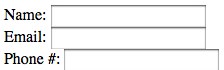
What I’m getting is this:
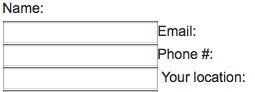
Those are screenshots, so here’s a “live” example:
Name:
Email:
Phone #:
Taking a look at the preview page using Firebug, I noticed that it was inserting <br /> in front of each input field. It did this with a select drop-down menu too. What gives? Anyone ever run into this?
Comments
4 Responses to “WordPress Inserting Line Breaks In Front of Form Elements”
Leave a Reply
-
Subscribe

Subscribe to my feed -
Twitter
-
My Other Stuff
-
Find It
-
Sites I Like
-
Archives
- August 2014
- May 2014
- April 2014
- February 2014
- November 2013
- October 2013
- September 2013
- July 2013
- June 2013
- May 2013
- January 2013
- September 2012
- August 2012
- July 2012
- May 2012
- March 2012
- February 2012
- September 2011
- June 2011
- May 2011
- March 2011
- December 2010
- June 2010
- April 2010
- March 2010
- February 2010
- January 2010
- December 2009
- November 2009
- October 2009
- September 2009
- August 2009
- July 2009
- June 2009
- May 2009
- April 2009
- March 2009
- February 2009
- January 2009
- December 2008
- November 2008
- October 2008
- September 2008
- August 2008
- July 2008
- June 2008
- May 2008
- April 2008
- March 2008
- February 2008
- January 2008
- December 2007
- November 2007
- October 2007
- September 2007
- August 2007
- July 2007
- June 2007
- May 2007
- April 2007
- March 2007
- February 2007
- November 2006
- October 2006
Geeked.info

I dont know how this works in wordpress but in HTML you should be using <label> elements instead of plain text descriptions.
I'm using label tags, and wordpress STILL adds a br before the input button!
The formatting of the button depends on label's background and it's broken.
How do I prevent that other than manually editing the database?
I hope you found a solution for this by now, but on the WP forums there was a nice little solution: http://wordpress.org/support/topic/240350
Basically using styles to ignore any br within the form section, nice but a bit hacky :)
I hope you found a solution for this by now, but on the WP forums there was a nice little solution: http://wordpress.org/support/topic/240350
Basically using styles to ignore any
's within the form section, nice but a bit hacky :)